Well spring is upon us as is the end of April as well. We’ve heard of the new iPad, iPhone OS 4.0 Betas 1 & 2, new MacBook Pro laptops but absolutely not a single word from Apple about this year’s WWDC conference. Last year it was held in early June and the dates were announced in late March. This year rumours have it that it will be held in late June.
Let’s see what happens. Oh and see you all in San Francisco.
Wednesday, 21 April 2010
WWDC 2010?

Saturday, 8 August 2009
Tuesday, 23 June 2009
iPhone 3GS
After almost 2 years of trusted service my iPhone was today replaced with the new all singing all dancing iPhone 3GS - 32GB. So far I am very happy with the speed and performance of the new device. Let’s see how the battery does!
Sunday, 14 June 2009
Snow Leopard 10.6 Build 10a380
Apple released build 10a380 (the last developer preview) of Snow Leopard last week. This apparently is the last developer preview released prior to shipping Snow Leopard in September.
Some of the new features include:
- Full 64-bit support.
- Intel only architecture resulting in faster applications, and far far less disk space for OS. Apple claims that Snow Leopard’s HD footprint is 6GB less than Leopard.
- Grand Central Station (framework for clever management of multi-processor multi-threading execution).
- OpenCL (Open Computing Language). New standards C based software abstraction layer for managing video processing power. This will allow developers to leverage GPUs in any application.
- New version of QuickTime (QuickTime X).
- Dock Expose (not included in this release).
Thursday, 4 June 2009
Pro JavaScript RIA Techniques Book
An ex-colleague and very good friend has just published his book on Pro JavaScript RIA Techniques. Den Odell is one of the best in the field of Web Development. Despite not having read the book yet myself, I am sure it is nothing sort of brilliant. Having worked closely with Den for a number of years, on large scale public facing web sites, I am completely confident in his skills and ability to transfer his knowledge to paper.
Read more about his book here.
Once again congratulations Den.
Wednesday, 3 June 2009
Visual Studio Magazine
Please read my contribution to the article posted by Visual Studio Magazine about Visual Studio 2010 Beta 1.
Article at Visual Studio Magazine
Monday, 18 May 2009
Visual Studio 2010 Beta 1 - Review
Just out for MSDN subscribers – Visual Studio 2010 Beta 1. Non subscribers don’t despair. General availability for Visual Studio 2010 Beta 1 will start this Wednesday.
Over the next few weeks I will be posting here my experiences with Visual Studio 2010 Beta 1. For now here’s a collection of screenshots from the Setup. Notice the nice change in allowing users to clearly select whether their are developing managed or unmanaged code!


Stay tuned!
Saturday, 2 May 2009
Windows 7 – XP Mode & Windows Virtual PC
Windows 7 RC is out, and as promised here’s a first look at XP Mode and Windows Virtual PC. There seems to be some confusion over some of the terms & names used in this technology. So here’s a quick explanation:
XP Mode – Currently in Beta and available for download from MSDN. It requires Windows 7 and it is nothing more than a pre-installed Virtual Machine Image File. Below are a couple of screenshots of the installation process.


So as you can see XP Mode is called Virtual Windows XP. Simply a pre-configured virtual machine image. So far that doesn’t sound too impressive right? Hold on and I think you will be pleasantly surprised.
Windows Virtual PC – is the second Beta download available from MSDN. It is available for XP SP3, Vista and Windows 7. Simply this is a newer version of Virtual PC simply named Windows Virtual PC. Unlike previous versions, this one does take advantage of virtualisation features of processors such as Intel VT etc. Under Windows 7, Virtual PC integrates really easily with XP Mode.
Using XP Mode with Virtual PC
Once everything is installed, it really is extremely easy to get started. Initially, Virtual PC will initialise the XP Mode image and this can take a few minutes.


During the initialisation, Virtual PC enables a feature called “Integration Services”. This really is quite clever but nothing new in the virtualisation space. It allows you to run applications installed on the XP Mode machine directly from the host operating system. It also goes a step further to even integrate notifications in the host’s system tray area. More about this later.
Finally a quick wizard asks you a few easy questions and boom!


Once you are up and running you will find yourself in familiar territory, if you have used Virtual PC in the past.

It is worth noting that the default settings of XP Mode, are set to give the virtual machine 256MB of RAM. This is configurable as most of the other settings XP Mode like in any other Virtual Machine setup with Windows Virtual PC. So far it looks pretty simple and nothing we haven’t seen before. This is were the “Integration Services” come into play. You can choose to run XP Mode as a full desktop, shown above, or use “Integration Services”. If you need to configure and/or install any legacy applications, such as Office 2003 or VB 6, then you would start XP Mode in full mode. Once everything is installed and configured you then don’t need to worry about starting it up again. XP Mode will be managed in the background for you and be ready when you need it. All your installed applications will appear in your host’s start menu.

When you are ready just fire up any of these apps. The application will be executed inside XP Mode but its output redirect to the Window Manager of the host and look as if it is part of your main operating system. If the virtual machine is already running you will be prompted that it needs to be closed. This takes seconds and allows the application to run seamlessly inside the host operating system.

As you can see above, Word 2003 and VB 6 are running under Windows 7’s XP Mode.
Conclusion
This is an extremely important feature that Microsoft is adding to Windows 7. It will help businesses of any size to ensure that their current investment in software is secure and that they can continue to operate in the future, despite moving to new operating system. It will also help Microsoft redeem itself of all the compatibility issues Vista had with various software applications. For a Beta version running under a Release Candidate version of Windows, I was extremely impressed with the performance and overall simplicity of XP Mode & Virtual PC. I can only hope and predict that Microsoft will integrate this even further, to the point that when an incompatible application with Windows 7 is installed, it will offer users an easy way to move it to XP Mode.
You can read more about XP Mode & Windows Virtual PC on Microsoft’s web site.
Windows 7 Release Candidate Review
Windows 7 RC is officially out of the door (at least for MSDN & TechNet Subscribers). Don’t panic Microsoft will be making this version available to the general public, as a preview download, on May 5th.

Over the next few weeks, I will try to give you more info into what Windows 7 is, and what new features and additions Microsoft has in store for us.
First up will be the infamous “XP Mode”! Stay tuned.
Wednesday, 28 May 2008
Mac OS X 10.5.3 & XCode 3 Beta 6 Out
Apple just released their latest updates for Leopard 10.5.3. Also today they released their latest, and probably last Beta version, of their developer tools XCode. The latest version the tools requires 10.5.3. The final version of the developer tools is expected to ship on the first day of the WWDC conference on June 9th.
Download the latest Mac OS X update either from Software Updates or from here http://www.apple.com/downloads/macosx/apple/macosx_updates/macosx1053update.html.
Download the latest Beta version of the developer tools here http://developer.apple.com/iphone/program/.
Wednesday, 21 May 2008
Mac OS X Tip #1- The Alt Key
Starting this week, I will be posting regular Mac OS X Leopard tips that I come across.
The Alt key is quite powerful on Macs. First hidden little secret is the System Profiler and the Alt key. If you want to start System Profiler quickly then hold your Alt key while you click on the Apple menu. The About This Mac menu item will change to System Profiler, and by clicking it will launch System Profiler instead of the About screen.

The Alt key has many hidden uses in Mac OS X and I will be revealing them slowly, so stay in touch. Also I am going to start talking about Xcode and Objective C very soon and everything about development on Mac OS X.
Thursday, 15 May 2008
My First Dashboard Widget
Well I have really moved over to the other side - Apple that is. Well yesterday I published our first ever Mac OS X Dashboard Widget, and today it has been listed on Apple's web site! Check out the screen shot and if you are sensible enough to be on a Mac download it here from Apple.

I built this widget within a few hours by using Dashcode, part of Xcode, Apple's free development tools for Mac OS X. Can you build one of these so quickly and elegantly for Vista? I don't think so!
Saturday, 3 May 2008
I'm a Mac!
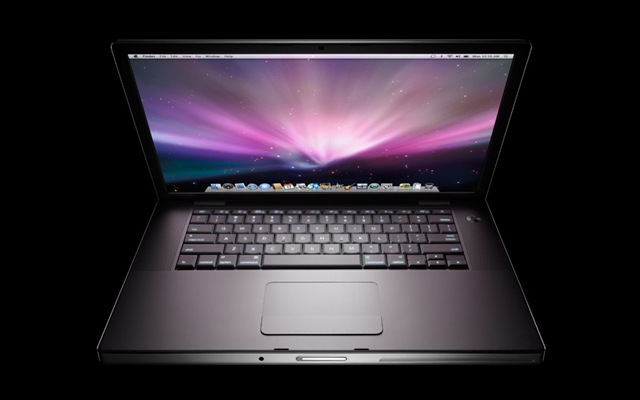
First it was the work iMac earlier this year. The trial machine ended up becoming an inseparable work partner. Not only Leopard is a first-class operating system but the iMac even runs Windows faster in VMWare than my original PC hardware did. I am now officially a Mac. I ditched my Lenovo laptop with its pathetic screen resolution (and you know how much screen space Visual Studio needs) for a brand new Macbook Pro (15.4" screen, 2.4GHz Core 2 Duo and 4Gb RAM). The machine simply screams of power. Visual Studio rocks on it in a VMWare Vista machine. Amazing screen resolution and with Leopard Spaces it only takes one keystroke and I switch from Leopard to Vista in no time. Can't wait to switch my home computer to a new 3.06GHz iMac this October - I think a great present for my 30th birthday!
I will keep you posted on how I get on but to get your appetite going here's a picture of the machine! GET A MAC - it doesn't just work - IT ROCKS!
Monday, 21 April 2008
Apologies + Windows XP SP3
To all my readers - I haven't been able to post anything for the last month. It has been quite a hard and difficult month in all fronts. But I do promise I will be back very soon. I have had a lot of demands for the Subversion installation articles. I promise I will be posting the remaining content on setting up Subversion and CruiseControl.NET very very soon.
Meanwhile enjoy downloading XP SP3 on the 29th of April. Microsoft just announced SP3 RTM!!!!
Sunday, 23 March 2008
iLove the iPhone
I finally got an iPhone through work for R & D. Namely trying to develop applications for the iPhone using the newly released iPhone SDK. This works really well with my new Apple iMac as the new SDK (which basically is Xcode) only works on a Mac.
Here is a screen shot of my hacked iPhone working with my Orange sim card.
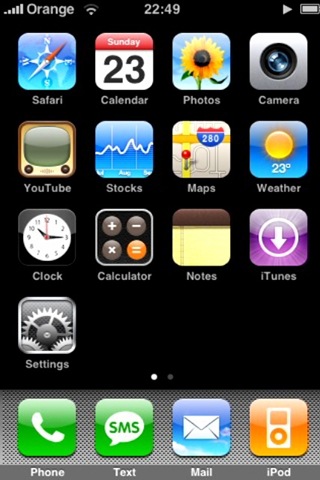
I will keep you posted on how I get on with my iPhone and the iPhone SDK.
Wednesday, 5 March 2008
Back from California to find IE8 Beta 1
Well San Francisco and Las Vegas were fantastic, but even better Internet Explorer 8 Beta 1 (IE8) is now available. You can download it here.
Well I will try to cover in a series of postings my experiences with it.
Installation
Not much changed here yet. As a matter of fact not much has changed generally with IE8's UI.
First Run
A new first run settings wizard walks you through the various different old and new settings available, such as Search, Apps and Safety Filter (aka Phising Filter).
Once you have completed the settings wizard you are prompted with the new IE8 Welcome Page, introducing you to the new features available such as IE7 Emulation mode and WebSlices.
IE7 Emulation
IE7 introduced a lot of "hacks" in order to maintain compatibility with previous versions. Subsequently this meant lack of Web Standards. IE8 now runs in Standards mode by default, but if you need to browse the Internet like IE7 then click the big IE7 Emulation button.
WebSlices
Another new feature, similar to that Safari offers on Mac OS X, is WebSlices. Developers can mark parts of web pages as "WebSlices" and enable users to monitor information they rely on as they move about the web. With a click in the Favourites bar, users see rich "WebSlice" visuals and developers establish a valuable, persistent end-user connection.
Finally when you browse to a web site, IE8 ensures you are sure of where you are by highlighting the domain name of the site - so hopefully Phising will become even more difficult.
I will keep you posted with more as soon as I start using it more and more. So far my main work website works!!!
Monday, 11 February 2008
Mac OS X 10.5.2 Released
Apple just released the anticipated 10.5.2 update for Leopard. Among the myriad of fixes the highlights of this major update are:
- Airport: Improves connection reliability and stability
- Back to my Mac: Adds support for more third-party routers, as detailed in this article.
- Dock: Updates Stacks with a List view option, a Folder view option, and an updated background for Grid view.
- Desktop: Addresses legibility issues with the menu bar with an option to turn off transparency in Desktop & Screen Saver preferences.
- Desktop: Adjusts menus to be slightly-less translucent overall.
- iSync: Adds support for Samsung D600E and D900i phones.
- RAW Image: Adds RAW image support for several cameras, as detailed in this article.
- Safari: Addresses issues with Safari reliably resolving certain domains.
- Time Machine: Adds a menu bar option for accessing Time Machine features (the menu extra can be enabled in Time Machine preferences).
- Time Machine: Improves backup reliability when computer name contains slash or non-ASCII characters.
- Time Machine: Addresses issues in which some external drives are not recognized by Time Machine.
Get your update via Software Update or via a Combo Installer here. One more thing after installing 10.5.2 there is one more update Software Updates will find the Leopard Graphics Update. Get it either via Software Updates or here.
Let's hope I can now connect to the Internet via my corporate MS ISA proxy server. Fingers crossed.
Sunday, 10 February 2008
I Heart San Francisco
Well it is that time of the year again that I need my American fix. So I am off for 3 weeks to San Francisco, Las Vegas and possibly Seattle to visit friends and family. Very tight schedule ahead but really looking forward to it. Sneaky visit to Microsoft and Apple. Ever since I told people I am going over, my phone hasn't stopped ringing. Between the countless calls from Bill Gates and Steve Jobs, I am finding it hard to decide who I am having dinner with every evening. *Just Kidding* - Although a sneaky visit to Redmond is most likely as a good friend is a VP there. Can't wait to raid the Employee Store with its great discounts again this year with him! Finally I am so looking forward to seeing my all time favourite Bette Midler in Las Vegas on her opening night in Caesar's Palace.
See you in a few weeks.
Monday, 4 February 2008
Windows Vista SP1 & Windows Server 2008 hit RTM
According to the Microsoft Windows Vista blog, today Microsoft released Windows Vista SP1 to manufacturing. Unfortunately it will not be until mid-March before it hits Windows Update and becomes available for download.
Today also Windows Server 2008 made it to manufacturing as well. As of a few hours ago Microsoft published the final versions for download in their MSDN Subscribers' Download area.
Hopefully it wont be too long before Vista runs faster on my iMac thanks to the service pack.
Friday, 1 February 2008
Apple iMac - 2 weeks on
Well it has now been two weeks since my amazing new Apple iMac arrived. So far it is a match made in heaven. Still no solution to the MS ISA Proxy server issue (although googling the problem reveals a possible fix in Leopard 10.5.2, that's about to be released).
I am almost completely happy with VMWare Fusion as well. My corporate workstation image with Windows XP and Visual Studio 2008 is actually running far more reliably and fast than it did on my HP workstation. The virtual machine is configured to use both cores of the Intel Core 2 Duo Extreme *Intel Inside Jingle* and 2GB of physical RAM. This configuration is pretty similar to my original HP workstation. The only annoying thing with Fusion 1.1 (not a problem with Parallels though) is the lack of support for multiple monitors. Basically if you are using multiple monitors you can not use both of them at the same time with the emulated machine. You can not drag Windows/Linux/OS2 windows from one monitor to the other in Unity mode. Hopefully a fix is soon on its way as Parallels do explicitly offer that option with their Coherence feature.
I suppose unlike a Tiger or a Leopard or a Panther I have managed so far to change my stripes and spots without problems!
Subscribe to:
Posts (Atom)